How AI Frame Interpolation Works for 2D Sprite Animations
In traditional 2D animation, “inbetweening” is the painstaking process of drawing all the transitional drawings between two primary keyframe poses. If an artist draws a character raising a sword (Keyframe 1) and striking down (Keyframe 2), someone must illustrate the 4 to 8 intermediate frames to make that strike look fluid.
For indie game developers and solo animators, drawing hundreds of in-betweens is rarely feasible within tight production schedules. As a result, many indie games settle for choppy 4-frame or 6-frame animations.
Over the past few years, AI-powered frame interpolation has emerged as a groundbreaking technology for 2D games, automatically synthesizing intermediate frames to elevate choppy animations into fluid 24 FPS or 60 FPS cycles.
In this technical deep dive, we explore how neural frame interpolation works under the hood, how it handles the unique challenges of 2D sprites, and how you can use it to enhance your game animations today.
The Technology: Optical Flow vs. Deep Neural Inbetweening
Frame interpolation is not simple cross-fading (dissolving between two frames just creates an ugly double-exposure ghost). To create a convincing new frame, the computer must understand where each limb, sword, and particle is moving in 2D space.
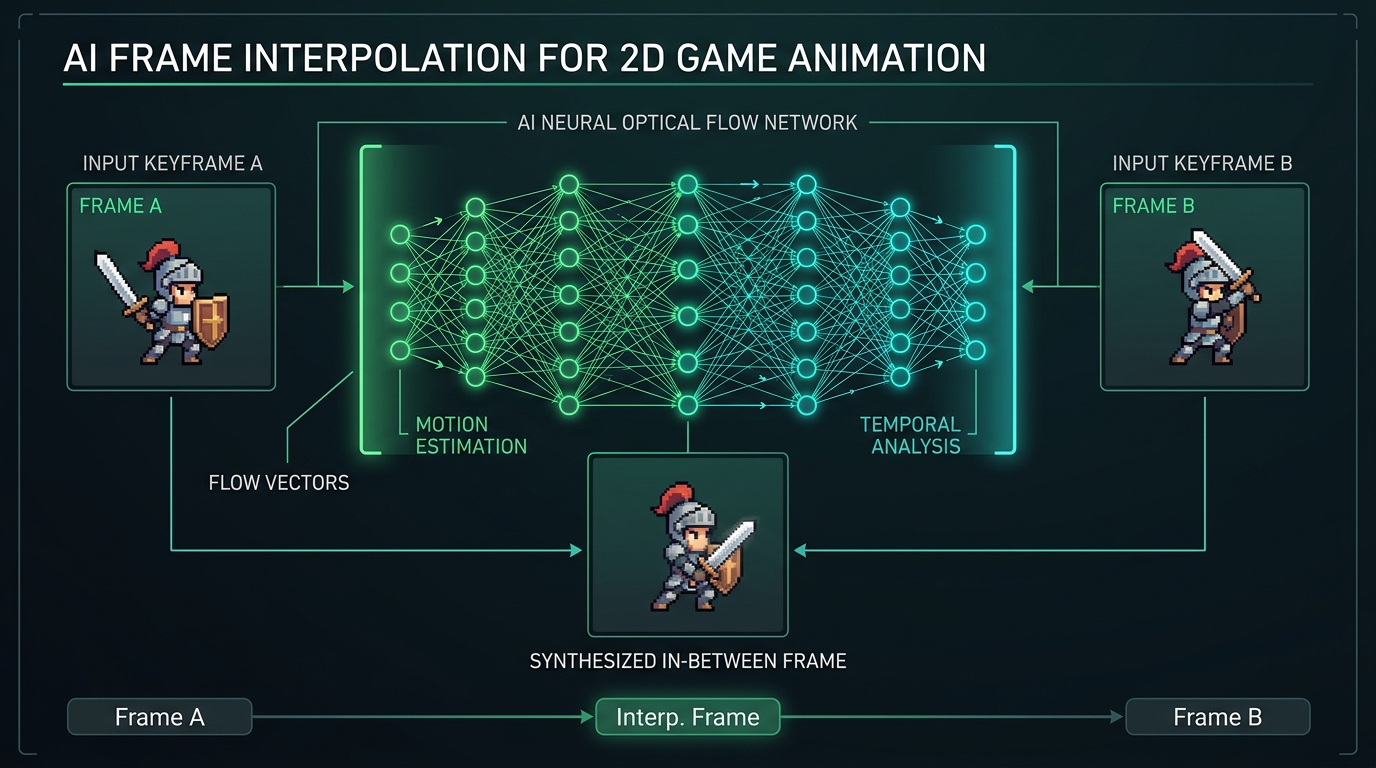
Modern AI interpolation combines two core technologies:
1. Bidirectional Optical Flow Estimation
The algorithm compares Keyframe A and Keyframe B, tracking pixel velocity vectors in both forward and backward directions. It identifies that the character’s sword moved 12 pixels down and 4 pixels forward, while the torso remained stationary.
2. Occlusion Masking & Neural Synthesis
When a character swings an arm across their chest, parts of the body become hidden (occluded), while the background behind the arm becomes exposed (disoccluded).
Deep learning convolutional neural networks (CNNs) and transformer models predict which pixels should be revealed or obscured, hallucinating realistic textures and color fills in the newly synthesized intermediate frame without visual tearing.
The Unique Challenge of 2D Sprites & Pixel Art
While standard video interpolation models (like RIFE and DAIN) work well on 4K live-action video, they often struggle with 2D game sprites for two reasons:
- Large Non-Linear Displacements: In retro combat animations, a punch or leap can travel across the screen in just 2 frames. Standard optical flow engines get confused by such extreme motion jumps.
- Sharp Pixel Grids vs Fuzzy Blurs: Standard video models produce anti-aliased, blurry gradient transitions. For pixel art, these soft edges ruin the aesthetic.
How Sprite2GIF AI Solves This:
Modern sprite-specific AI tools apply Palette-Constrained Neural Inbetweening. The model calculates the motion vector, synthesizes the intermediate pose, and automatically quantizes the resulting pixels back into the original color palette using nearest-neighbor quantization.
Practical Applications for Indie Game Developers
- Converting 4-Frame Walk Cycles into 12 FPS: Take classic retro walk keyframes and generate 2 intermediate in-betweens per step for silky, modern platformer movement.
- Slow-Motion Death & Impact FX: Generate dramatic slow-motion replays and death sequences from standard combat sprite sheets without drawing extra assets.
- Smooth UI Micro-Animations: Expand 3-frame icon bounces into fluid 60 FPS web hover states.
Ready to test neural interpolation on your own game assets? Try our ai sprite sheet generator & frame interpolation tool to preview and enhance your animations directly in your browser.