Why Client-Side Processing Matters for Indie Game Assets
When you are developing an unannounced indie game, your artwork, character concepts, and animation sheets represent months of hard work and your most valuable intellectual property.
Yet, when developers need a quick utility—like converting a sprite sheet into an animated GIF, packing loose PNGs, or trimming transparent margins—they often turn to random online file converters.
What most creators do not realize is that the vast majority of online file conversion websites upload your raw image files directly to remote cloud servers. Once your files leave your computer, they may sit in temporary buckets, be subject to data leaks, or even be scraped into third-party datasets without your consent.
In this article, we explain the difference between cloud-based and client-side processing, why browser-native architecture is a game-changer for digital privacy, and how modern web standards make it possible.
Cloud Converters vs. Client-Side Browser Converters
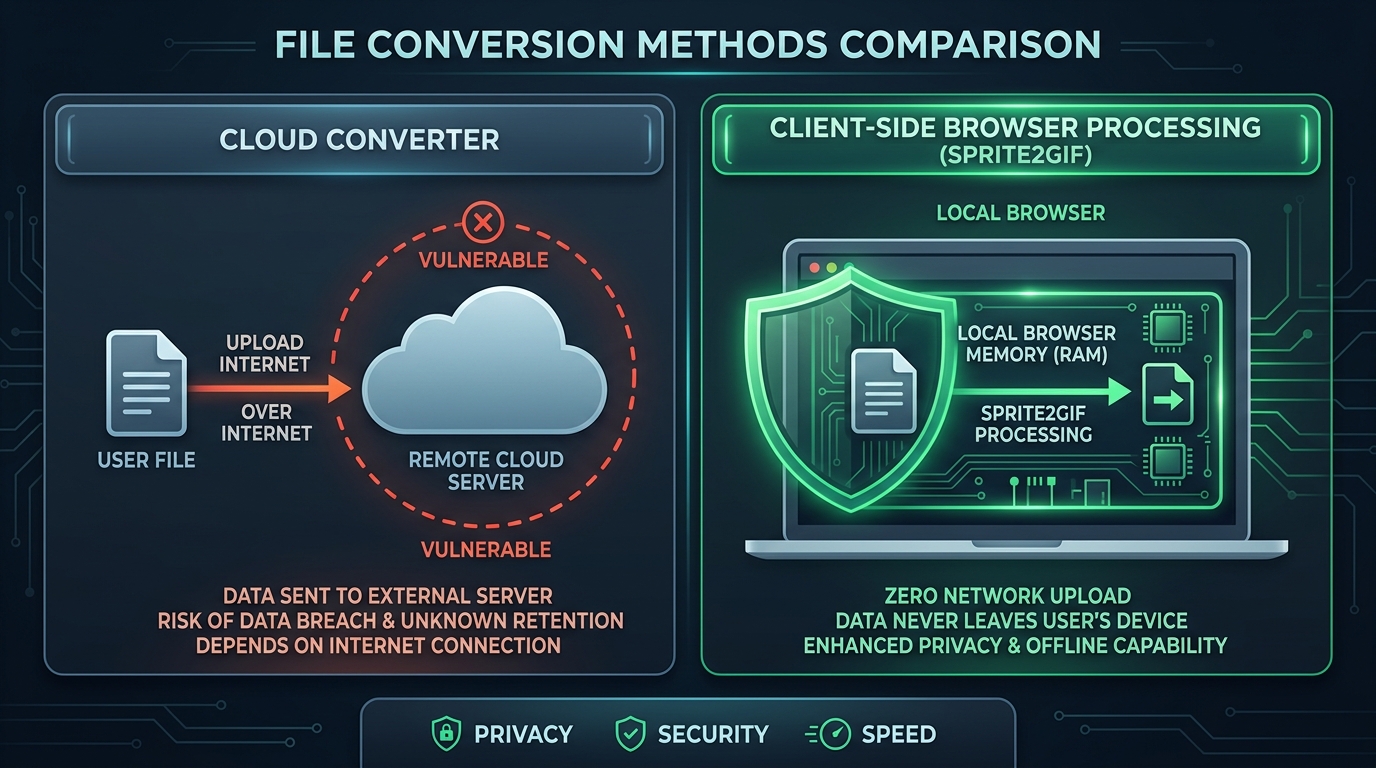
1. Traditional Cloud-Based Converters
When you drop an image into a traditional online converter:
- Your file is sent across the internet to an external server.
- The server writes the file to disk and runs a background utility (like ImageMagick or FFmpeg).
- The converted file is saved to an Amazon S3 bucket or temporary storage directory.
- You are provided a download link to pull the result back.
The Risks: Slow upload/download speeds on large files, bandwidth costs, potential server leaks, and loss of data confidentiality.
2. Modern Client-Side Converters (Sprite2GIF Architecture)
Modern browsers have evolved into full-fledged execution engines. With HTML5 Canvas, the File API, and WebAssembly (Wasm):
- Your browser reads the file directly from your local hard drive into your device’s local memory (RAM).
- Slicing, bounding box calculations, auto-alignment, and GIF encoding happen entirely on your computer’s CPU/GPU.
- The exported file is generated directly in your browser and saved to your Downloads folder.
- Not a single byte of your artwork is transmitted across the internet.
Why Client-Side Processing is Superior for Game Creators
1. 100% Guaranteed IP Protection
Whether you are working under strict publisher non-disclosure agreements (NDAs) or building a stealth indie passion project, client-side tools guarantee your unreleased character designs and texture atlases remain completely confidential.
2. Blazing Speed with Zero Network Latency
Cloud converters require uploading multi-megabyte 4K sprite sheets before processing even begins. Client-side tools operate at the speed of your local hardware, delivering instantaneous real-time previews and instantaneous frame slicing.
3. Works Offline
Because the processing engine lives in your browser’s local sandbox, you can load the web app once and continue slicing and converting sprites even without an active internet connection—perfect for working on airplanes, trains, or remote game jams.
Experience Privacy-First Game Asset Tools
At PlanckStudio, privacy and performance are at the core of our engineering philosophy. All of our core utilities—including our spritesheet to gif converter, gif to spritesheet splitter, and png to spritesheet packer—run 100% client-side in your browser.
Protect your assets and experience lightning-fast sprite editing with our free sprite sheet tools today.